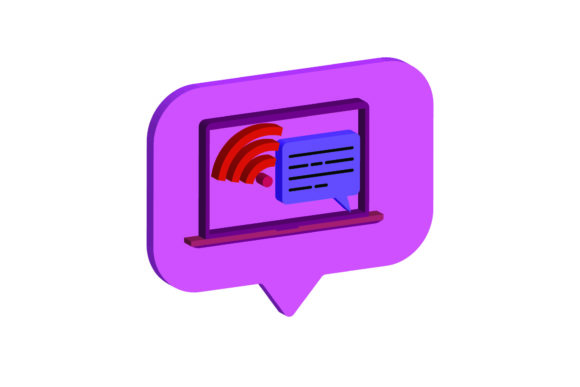
Icon Laptop 3D E - Mail Design Assets
In the modern digital landscape, visual communication is paramount. Whether you are crafting a professional email signature, designing a promotional banner for a tech startup, or creating content for social media, having high-quality, versatile graphics can make a significant difference. The Icon Laptop 3D E - Mail asset pack addresses this need by providing creators with a polished, three-dimensional representation of a laptop that is both aesthetically pleasing and highly functional. This resource is designed to streamline your workflow while elevating the visual quality of your projects.
At its core, this design asset is more than just a static image; it is a comprehensive toolkit for designers, marketers, and entrepreneurs who require flexibility in their creative output. The inclusion of multiple file formats ensures that whether you are working on vector-based illustrations, preparing files for physical printing, or simply needing a quick raster image for web use, you have the right tool for the job. Understanding what you get in this package allows you to maximize its potential across various platforms and mediums.
What You Get: A Comprehensive Digital Package
When you acquire the icon laptop 3D design, you are not receiving a single, limited file type. Instead, you receive a total of six distinct digital files, each tailored to specific editing needs and software environments. All assets are generated on a consistent 1920px x 1280px canvas size, ensuring uniformity and high resolution regardless of the format chosen. This standardization is crucial for maintaining quality when scaling images for different display sizes.
The package includes the following formats, each serving a unique purpose:
- AI File (Adobe Illustrator): Ideal for users who need full editability within Adobe’s ecosystem. You can modify colors, shapes, and layers with precision, making it perfect for custom branding.
- EPS File (Encapsulated PostScript): A robust vector format compatible with many design applications beyond Adobe. It preserves scalability without loss of quality, suitable for professional print workflows.
- SVG File (Scalable Vector Graphics): The gold standard for web design. SVGs remain crisp at any size and are lightweight, making them excellent for responsive websites and interactive elements.
- DXF File (Drawing Exchange Format): Essential for those involved in CNC cutting, laser engraving, or other fabrication processes. This format bridges the gap between digital design and physical production.
- JPG File (JPEG): A widely supported raster format perfect for quick previews, email attachments, and general web usage where file compression is acceptable.
- PNG File (Portable Network Graphics): Offers transparency support, allowing the laptop icon to be placed over any background seamlessly. This is particularly useful for overlays, presentations, and composite designs.
Why Versatility Matters in Modern Design
The primary appeal of the Icon Laptop 3D E - Mail asset lies in its adaptability. In a world where a single brand identity must appear consistently across websites, business cards, merchandise, and digital advertisements, having a graphic that can be easily adapted is invaluable. For instance, a small business owner might use the PNG version for their website header, the SVG for scalable icons on their app interface, and the DXF version to create branded merchandise like laptop sleeves or desk mats.
For educators and bloggers, the ease of editing provided by the AI and EPS files means you can quickly tweak the design to match seasonal themes or specific course materials without needing advanced graphic design skills. The ability to change colors or isolate specific parts of the laptop allows for a personalized touch that resonates better with your audience than generic stock imagery.
Practical Applications Across Industries
The utility of this 3D laptop icon extends far beyond simple decoration. Here are several realistic scenarios where these assets can drive value:
Digital Marketing and Email Campaigns
As suggested by the name, this asset is particularly effective for email marketing. Including a 3D element in your email newsletters can increase engagement rates by breaking up text-heavy layouts. The Icon Laptop 3D E - Mail provides a clean, modern focal point that draws the eye toward calls-to-action, such as "Download Our Guide" or "Sign Up for Webinars."
Product Mockups and Presentations
If you are selling software, online courses, or digital services, showing your product on a realistic device adds credibility. You can use the transparent PNG to overlay your own screen designs onto the laptop, creating convincing mockups for client presentations or sales pages. This saves time compared to photographing physical devices and ensures a consistent look across all your materials.
Physical Product Creation
For makers and hobbyists, the DXF file opens up possibilities for tangible products. You can cut out the laptop shape from wood, acrylic, or metal to create desk organizers, keychains, or decorative wall art. The vector nature of the source files ensures that the cuts are precise, resulting in a professional finish.
Considerations Before You Start
While the icon laptop 3D package offers extensive flexibility, there are a few practical considerations to keep in mind to ensure the best results. First, always check the licensing terms associated with the purchase. While most personal and commercial use cases are covered, some restrictions may apply regarding reselling the raw asset as-is. Always integrate the design into larger compositions rather than redistributing the standalone file.
Secondly, consider your software proficiency. If you are unfamiliar with vector editing programs like Adobe Illustrator or Inkscape, the AI and EPS files might present a learning curve. However, the JPG and PNG files are ready to use immediately in any basic image editor or presentation software. Start with the raster files if you are a beginner, and gradually explore the vector options as you become more comfortable with design tools.
Finally, remember that resolution matters. Although the canvas is set at 1920x1280 pixels, which is sufficient for most screens, extremely large-format prints may require higher resolution sources. In such cases, relying on the vector formats (AI, EPS, SVG) is essential, as they can be scaled infinitely without pixelation.
Conclusion
The Icon Laptop 3D E - Mail asset pack is a thoughtful collection of digital resources designed to meet the diverse needs of today’s creators. By offering six different file formats on a standardized canvas, it removes technical barriers and allows you to focus on creativity and communication. Whether you are enhancing your digital presence, producing physical goods, or simply looking to add a touch of professionalism to your emails, this 3D laptop icon provides a reliable, editable, and visually striking solution. Embrace the versatility of these files to streamline your workflow and elevate the visual impact of your work.